Sessions
Agents keep track of their conversations with sessions. One conversation is one session. To begin chatting with an agent, you need to create a session first. Each message sent by the user and each response from the agent is appended to the session. Sessions also provide a workspace for artifacts, allowing agents to work with uploaded documents and images throughout the conversation.
This page covers operator sessions, created and read with an API key that can act across any of your customer's sessions. If you want to hand the session credential directly to an untrusted client, such as a browser tab or a mobile app, see End user sessions instead.
Chat with your agent
After creating an agent, you can interact with it by creating a session and sending messages. Sessions provide conversation context and are required for all agent interactions.
Create a session (UI)
- Log into the Vectara Console.
- Navigate to the Agents page.
- Select an agent from the list such as Agent Research Assistant.
The agent opens the Preview tab.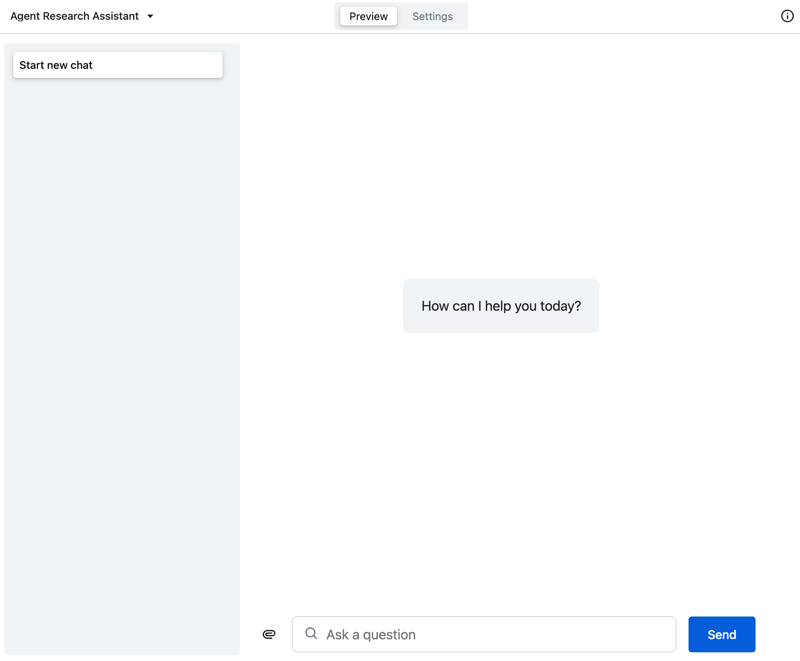
- Chat with the agent in the Preview tab.
- Upload artifacts (files) to the session, and chat about these artifacts
with your agent.
You can continue to configure and fine tune the agent through the Settings tab.
Create a session (API)
- Send a
POSTrequest to the sessions endpoint.CREATE A SESSION
Code example with multiple language options.1 - Once you have a session, send messages using the events endpoint:
SEND A MESSAGE
Code example with multiple language options.1
The agent will respond with events including its reasoning, tool usage, and final response.
You can also upload files (documents and images) to the session workspace using multipart requests. See Artifacts for details on working with files in agent sessions.
Define session context with session metadata
Let's say you want to make the agent aware of the user's preferred language, so that it can respond in that language. Or imagine you want to tell the agent that the user is only permitted access to a specific type of data. You can do all this with session metadata. Session metadata enables you to inject arbitrary information into the session context, which your instructions and tools can refer to.
Session metadata provides context-specific data to agents, enabling personalization, security controls, and dynamic behavior. This key-value data attaches to a session and becomes accessible as follows:
- Agent instructions (Velocity templates) using
${session.metadata.field}syntax - Tool configurations (argument overrides) using
{"$ref": "session.metadata.field"}syntax
Here's how you might implement the language preference and access control examples.
Example session with metadata
SESSION WITH COMPREHENSIVE METADATA
Code example with bash syntax.1
Then you'd write an instruction like this, to respond in the preferred language.
INSTRUCTION REFERENCING SESSION METADATA
Code example with json syntax.1
And you'd configure a corpora search tool like this, to limit the user's access to certain corpora.
Passing per-user identity and downstream permissions
When your application authenticates users through SSO, the session is the right place to carry the identity data that downstream tools need. Your UI creates the session after authentication and writes the user's attributes and any per-user OAuth tokens into metadata.
Create the session with the user's identity:
POST /v2/agents/{agent_key}/sessions
{
  "metadata": {
    "user_email": "alice@example.com",
    "user_groups": "procurement,uk-employees",
    "workday_token": "<alice's Workday OAuth token>"
  }
}
Reference the token from the tool's argument_override using $ref. The token is resolved at call time from the session — the LLM never sees the value.
{
  "workday_lookup": {
    "type": "web_get",
    "argument_override": {
      "token": { "$ref": "session.metadata.workday_token" }
    }
  }
}
When the agent calls this tool on behalf of Alice, the downstream system sees Alice's token and returns only what Alice is permitted to see. Vectara does not replicate the downstream system's permission model — enforcement happens at the call site. The same shape works for any system that accepts a per-user credential: substitute workday_token with the relevant metadata field.
Scoping corpus search to the current user
For ingested data where ACL fields were written onto documents as metadata at ingest time, store a pre-built filter expression in session metadata and reference it from the corpora_search tool's argument_override.
Create the session with the filter expression:
{
  "metadata": {
    "user_email": "alice@example.com",
    "corpus_filter": "'alice@example.com' IN doc.acl_readers OR 'procurement' IN doc.acl_groups OR doc.acl_is_public = true"
  }
}
Reference the expression via Velocity template in argument_override:
{
  "knowledge_search": {
    "type": "corpora_search",
    "argument_override": {
      "metadata_filter": "${session.metadata.corpus_filter}"
    },
    "query_configuration": {
      "search": {
        "corpora": [{ "corpus_key": "company-knowledge" }]
      }
    }
  }
}
The filter is OR-shaped — any path that grants access lets the document through. Generated responses can only draw on passages that passed the filter, so the model cannot quote content the user is not permitted to see. For the full ABAC setup, see Attribute-based access control.
TOOL WITH METADATA-BASED ACCESS CONTROL
Code example with json syntax.1